Thursday, March 4, 2010

DON'T PRESS F1!!!

There have been reports of attacks on computers from the internet via Internet Explorer...

===================================

"Microsoft is investigating new public reports of a vulnerability...on supported versions of Microsoft Windows 2000, Windows XP, and Windows Server 2003 through the use of Internet Explorer..."

Affected Software
Microsoft Windows 2000 Service Pack 4
Windows XP Service Pack 2, Windows XP Service Pack 3, and Windows XP Professional x64 Edition Service Pack 2
Windows Server 2003 Service Pack 2, Windows Server 2003 with SP2 for Itanium-based Systems, and Windows Server 2003 x64 Edition Service Pack 2


----------------------------------------------------------------------

"On Friday 2/26/2010, an issue was posted publicly that...an attacker...could convince a user to visit the web page and then get them to press the F1 key in response to a pop up dialog box....

"Anyone believed to have been affected can visit: http://www.microsoft.com/protect/support/default.mspx and should contact the national law enforcement agency in their country. Those in the United States can contact Customer Service and Support at no charge (for computer security related issues) using the PC Safety hotline at 1-866-727-2338 (PCSAFETY). Customers outside of the United States can visit http://support.microsoft.com/international to find local support information."


-----------------------------------------------------------------------

"...Windows 2000 and Windows XP are impacted...Windows 2003 Server is also impacted...With this issue, it is possible for a malicious web page to display a dialog box which will trigger the execution of arbitrary code when the user presses the F1 key. The prompt can appear repeatedly when dismissed, nagging the user to press the F1 key. Platforms are affected regardless of the Internet Explorer version installed."


Labels: , , , ,

Saturday, December 26, 2009

Googled - The End of the World As We Know It


This book is not just about Google. It is also a reminder about services and advancements that led to help create what Google is, and does, today. And, how Google has affected and inspired others: competitors, and partners.

After reading the preface, and before the first chapter, I wondered: why doesn't Google buy AOL? The more you go through the book, the more you find that (initiallly) Google never saw themselves as a content provider: more of a conduit to content. (However, as I progress through the book it is revealed how that is not currently true...)

In the beginning of the first chapter Auletta describes the facilities and services at Google. I begin to remember...and greatly miss...the "good ole days" when I worked for Microsoft (under a subcontract with Keane) in their support division that was located in Tucson. Before Google did, Microsoft/Keane had taken into consideration what needed to be done for staff so they can do for customers: a no/low stress environment and atmosphere that allowed for creativity and productivity...the same type of environment that appears to exist at Google. (If only others would learn from these examples...)

"Don't be evil" is often confused with the Google Mission Statement. "Google's mission is to organize the world's information and make it universally accessible and useful..." The mission statement is a part of the Google Code of Conduct (and an interesting read). Paul Buchheit was the creator and lead developer of Gmail...and suggested the motto, "Don't be evil".

For as much information as they gather, and as much as others are concerned about them...based on what I've read in the book...I'm impressed with the amount of transparency Google provides compared to other corporations and businesses.

As I continue to read the first chapter I noticed that a lot positive things done at Google, and that Google has done, are noted. It caused me to refer back to the title of the book..."Googled - The End of the World As We Know It"...because initially, from the title, I perceived a negative flavor (as in, I would learn of the evil some state that Google does). I found I needed to clear my head of my expected prejudice, and try to keep an open mind as I continue...

----------------------------------------

While reading chapter three I am reminded that things done with passion seem to be much more successful and enduring. I relate what the founders of Google have done to the career I chose, radio broadcasting: throughout the book there are descriptions of incidents that the business world, as we have come to know them, were focused on...but those at Google were not. And, more often than not, those at Google had the better idea(s)...

In the early day of the search engine, due to the way some results were calculated for searches, adult and pornography websites appeared at the top of some queries. How they resolved that issue is explained in the book. I found it to be funny that those particular types of websites had appeared prominently. As with other things in life, if you know how to get the results and outcomes you desire, it's possible to do so: you can "play/game the system".

After reading about the first chef hired at Google, I searched Google for "google chef". I'll let you do so and enjoy what the first result is (hopefully it will be what I saw...it's a "cute" and fun result).

The descriptions of the personalities of those who work for, and at, Google are consistent: people who are bright, can be somewhat eccentric, and not polished in some socially accepted graces and behaviors. Which should sound very familiar by now because of all of the profiles that have been done of people in technology related fields. For lack of better terminology: nerds.

------------------------------------------

For four years, Google was the search engine for Yahoo! I had forgotten about that. And I don't think there's any reason I should have remembered because it was a service behind the (AOL) service. (February 10, 2004...at 9:30 PM PST, on a Tuesday...Yahoo! dropped Google.)

----------------------------------------

As I am reading chapter five, I realize I have been reading this book for a few days (three). Other books I have finished in hours; this one has a lot of information I want to try to absorb and understand. I don't want to miss anything. (I have more to say about this below...)

---------------------------------------

In chapter six, "Google Goes Public", you'll find the most unusual situation of a company for offering stock ever known. Even if you know nothing about the subject, you'll find their approach could send those who have standard expectations for investing in a business to seek psychological services: I perceived A Letter from the Founders as a declaration of war on greedy-ass investors, and hope there are more letters of its kind in the future from other enterprises.

---------------------------------------

This book will also introduce you to people that are not with Google the company, but relate to it. And some can be considered responsible for it. For example:

As I began chapter eight, "Chasing the Fox", Auletta mentions that Rupert Murdoch had purchased MySpace...which caused me to wonder if Murdoch's stigma has anything to do with Facebook appearing to overtake MySpace. But that's another subject for another time...

The co-founder of Facebook...Mark Zuckerberg...and I are in agreement: in an interview, he explained that MySpace is "a platform to pump and push media out to people". It's something I perceived, have on many occasions stated to others. (In my early uses of Facebook, I found it to be more of a closed and corralable service/environment.)

And that led me to remember Orkut...which, for now, exists. And just seems to. But I do wonder what could happen if Google decides to become "serious" about it and really go after MySpace and Facebook. As I was writing this, I decided to take a look at Orkut (which I haven't done for months). It's "OK"...has a new layout and look...but, again, it's not as inviting as Facebook and MySpace can be.

"Big companies don't innovate. They operate..." That quote is attribued to Jason Hirschhorn, formerly the Chief Digital Officer at MTV Networks, and now the Chief Product Officer of MySpace. If you've ever worked for a "big company" you know it can be true: sometimes it takes too long to go through all of the procedures to get something done...while other organizations have conquered and moved on because they don't have many hindrances to action.

There's some information in the book about the personage of Marc Andreessen, the cofounder and vice president of technology for Mosaic/Netscape Communications (the company that developed the Netscape Navigator web browser). He seems to be a voracious consumer of content from many, many channels and services...more than I ever imagined to attempt to use. He has multiple subscriptions to television service providers.

=======================================

This book can inspire "thinking outside of the box"! Add it to your personal collection...give it as a gift. As some look to the bible for inspiration, I propose so should some use this.

Encourage for it to be read more than once. (I encourage you to.) To get as much as you can out of this book, it will need to be: throughout the book I found things and events were mentioned, and then later mentioned again and expanded upon to enhance a point that is being explained or examined. Don't try to rush through this book. Take your time...at least a week...to comfortably consume its contents.

Enjoy. I expect you will. I did.

========================================

A video of Ken Auletta on "Q&A" (from November 1), of Book TV, that was on the C-SPAN channel, can be found at http://www.c-spanvideo.org/program/id/214624

Labels: , , , , , ,

Friday, October 30, 2009

HACKING EXPOSED: Network Security Secrets & Solutions

HACKING EXPOSED: Network Security Secrets & Solutions, 6th Edition" is 720 pages, and over two pounds, full of information. And I found, as stated in the forward: "...Its goal is education..."

It is full of all kinds of knowledge.

Table of contents
Part I: Casing the Establishment
Chapter 1. Footprinting
Chapter 2. Scanning
Chapter 3. Enumeration
Part II: System Hacking
Chapter 4. Hacking Windows
Chapter 5. Hacking Unix
Part III: Infrastructure Hacking
Chapter 6. Remote Connectivity and VoIP Hacking
Chapter 7. Network Devices
Chapter 8. Wireless Hacking
Chapter 9. Hacking Hardware
Part IV: Application and Data Hacking
Chapter 10. Hacking Code
Chapter 11. Web Hacking
Chapter 12. Hacking the Internet User
Part V: Appendixes
Appendix A. Ports
Appendix B. Top 14 Security Vulnerabilities
Appendix C. Denial of Service (DoS) and Distributed Denial of Service (DDoS) Attacks


Some of the new material includes:
the "Hacking Hardware" chapter (about physical locks, access cards, RFID, laptop security, USB, U3, Bluetooth, firmware, hard drives)...
Windows hacks (covering Terminal Services, Kerberos sniffing, man-in-the-middle attacks, Metasploit, device driver exploits, new password cracking tools)...
and UNIX hacks (such as THC Hydra, Solaris input validation attacks, dangling pointer attacks, DNS cache poisoning, UNIX Trojans, and kernel rootkits).

Some of the tactics and strategies that attackers use to gather information to prepare targets for attacks are noted, like: culling IP addresses, wardialing (it can still be effective), and spoofing e-mail messages (pretending to be support and administrative personnel).

To defend against attacks, you must understand the enemy. Preparing against access is better than trying to make repairs after a system has been. (Once someone has been inside you don't know what was left in the system, and where it was left at.) Instructions on how to perform network reconnaissance show how a network, and connected devices(firewalls/routers/etcetera), can be diagrammed. And there is a section regarding how to identify potential probing activities, and attacks.

This book can be used as a checklist of things that can sometimes be unintentionally available, but are: (web) cameras, and remote administration services...and the Microsoft Windows Remote Desktop Web Connection. Misconfigurations exist, and so do exploits that target them.

In Chapter 4, "Hacking Windows", there's a great reminder about proper password management. I've noticed that people seem to be better at it, but it's good to review best practices.

In the book the authors point towards many other sources of information and reference. There are suggestions of other books to enlighten and educate about how some prepare to access a network. And other websites and software that will allow you to test the openess of a network (hardware and services) and website.

(After going through the book, I remembered how there are instances where administrators and content managers are given more consideration than support and security managers and personnel...until there's a problem.)

If you are responsible in any way for a network or website, get this book. If there is anyone that works for you that is responsible for a network or website, get this book for their library!

The website of the book is http://www.hackingexposed.com

Labels: , , , , , ,

Saturday, October 17, 2009

book about witty Twitter posts


I received “Twitter Wit: Brilliance in 140 Characters or Less” from the publisher, HarperCollins. It's "edited" by Nick Douglas and contains posts from Twitter.

Some of those posts are from celebrities: Ashton Kutcher, Jimmy Fallon, Stephen Colbert, Neil Gaiman, Margaret Cho, Stephen Fry, Rainn Wilson, Penn Jillette, Diablo Cody, Michael Ian Black, Paula Poundstone, Eugene Mirman, Russell Brand, Aziz Ansari, Lisa Lampanelli, John Hodgman, Sarah Silverman, Susan Orlean, and more. (To my surprise, I didn't notice any from Shaquille O'Neal...)

The first "tweet" in the book got it off to a good start for me: "What's the deal with deaf people? Like, HELLO?" (Get it? As in, "Hello...and now we begin the book"?...) After that, I thumbed through it to see if any other posts might jump-out at me. What I found is that I would rather not reveal any more quotes, because I think the book is best experienced through your own browsing.

I intend to keep it accessible and available for those times when I'm trying to kill time. It's available in paperback. And, as an e-book (Sony, Kindle, eReader, and PDF formats). I suggest you put it in your purse, backpack, or portfolio for when you want (or need) to have something to do. The greatest thing about the book is that you can start reading it, and stop without feeling that you invested effort to either action.

Douglas (http://twitter.com/nick, http://toomuchnick.com) should be working on a follow-up. With more pages.

I wish I had thought of doing this book...(heel of palm to forehead)

Labels: , , , ,

Tuesday, September 15, 2009

TCP/IP not secure in Windows 2000 and XP

As usual, when it comes to computing, we go forward and not backward...

Over the past week I have disposed of many electronic devices because...they are old. They worked, but no longer in "supported" scenarios: with current operating systems, with current connections (parallel printer/serial ports), etcetera.


I am not surprised, and expect this attitude...until I remember that netbooks are being released with Windows XP as the operating system! And I had been seriously considering getting one...

For other computers, in regards to their hardware and software, it's time to evaluate whether Windows Vista (or 7) will be compatible. (As well as some version of Linux...)

Labels: , , , ,

Wednesday, December 3, 2008

vCards, and hCards

vCards are electronic business cards They can be used by Personal Information Managers, e-mail applications, web browsers, personal digital assistants (PDAs), and other computer programs. A vCard can contain more than a printed business card. Not only names, addresses, telephone numbers, graphics/pictures, and website addresses...but also audio, geographic and time zone information, and can support multiple languages.

You can create a vCard at http://www.vicintl.com/vcf/

-----------------------------------------------------

The next generation, if you will, are hCards...HTML vCards...for use on webpages.

The template at http://tantek.com/microformats/hcard-creator.html allows for:
name
company
street
city/state/zip code
phone
url (website address)
and a photo url (web/internet address).

The template at http://microformats.org/code/hcard/creator has more options:
given name
middle name
family name
organization
street
city
state/province
postal (zip) code
country name
phone
email
url (website address)
photo url (web/internet address)
AOL Instant Messenger screenname
Yahoo! Instant Messenger screenname
Jabber screenname
and allows for tags.

Labels: , , , , , , ,

Saturday, November 8, 2008

Pure Networks Security Scan

I tried the Pure Networks Security Scan on one of my computers...some of my results are below. You must enable Active Scripting to run test...

------------------------------------------------

Pure Networks Security Scan

Redirected Websites
"...File and Printer Sharing settings...you might have problems due to the guest account being disabled. This can cause problems if you are trying to connect to shares on this computer from older Windows systems like Microsoft Windows 98 or Windows ME. It can also cause problems if you don't have exactly the same user names and passwords on all of your PCs."

Software Firewall
"The 'Microsoft Windows Firewall' firewall is enabled on your system...to get file and printer sharing working between computers, you need to open some ports in the software firewall...If you are interested in easily sharing files and printers on your network, download the free version of Network Magic - it takes care of everything for you. If you are having problems getting the most out of your network, download the free version of Network Magic. It will even show you a Network Map and tell you which PCs have a firewall installed and which ones don't."

[I DID NOT FIND A "FREE" VERSION ON THEIR WEBSITE...maybe they mean that there are some free features available in the trial version... - SLICK]

Antivirus Software
"No enabled antivirus software was found."

Windows Update Not Automatic
"Windows Update is not set to automatically download and install updates."

Internet Connection
"Not connected to the Internet."

Dynamic IP Address
"Your computer is configured to automatically receive an IP address...The IP address that this computer is using is..."

Router Present
"Found router (make, model, and IP address)...We found a hardware firewall inside the...router which is protecting your network."

Router Password
"Your router has the default password set. The password for your router is currently set to the well-known factory default. All routers from a given manufacturer ship with a well-known default password. Having a default password is a bad thing because hackers can then use this to access your router..."

[The router doesn't belong to me...I am not the subscriber of the internet service provider...it is a DSL router... - SLICK]

Multiple Router Check
"Your router is connected normally to the Internet. You are connected normally to the Internet through one router."

Router Firmware Version
"Firmware version...is possibly out of date."

Default Network Name (SSID)
"Your network name...has been changed from the factory default. Your wireless network name (SSID) has been changed from the router's factory default SSID. Excellent work. Having your SSID set to the factory default can be bad for two reasons: 1) if your network isn't encrypted, other users are more likely to connect to your network unexpectedly and 2) if you use your computer outside of your home, it is more likely to unexpectedly connect to other networks using that same default SSID."

Signal Strength
"Your wireless network signal strength is 'good'..."

Secure Wireless Connection
"You are connected to a secure, encrypted wireless network...using the 802.11 WEP standard. The wireless network you're connected to is using an encryption method called WEP."

Wireless Network Name (SSID) Conflict
"Your wireless network is the only one in range with the network name..."

Wireless Encryption
"You have 802.11 WEP enabled, but your router supports 802.11 WPA encryption which is stronger encryption. Your router is correctly configured to use an encryption method called WEP...Your router also supports the more secure WPA encryption method. WEP has a number of security flaws that make it easy for hackers to crack. We recommend you consult your router vendor's manual about configuring your wireless router to use WPA instead. (Note that there are some devices that support WEP but not WPA, so you should check all devices that connect wirelessly to your network to verify they support WPA.)

[See my statement below about my experience with modifying Qwest DSL modems... - SLICK]

Network Magic Wireless Protection Compatible
"Your router is fully compatible with Network Magic Wireless Protection. Your...router is on the list of routers that are fully supported by Network Magic Wireless Protection..."

MAC Address Filtering
"Your router is not using MAC address filtering...We recommend that you enable MAC address filtering..."

SSID Broadcast
"Your router is broadcasting its SSID."

-------------------------------------------

I've had trouble attempting to configure Qwest DSL modems: changes I made, that I consider to be simple, had disabled wireless internet access. So, I refuse to try to make any adjustments for this Qwest DSL subscriber unless: I have a full day to devote to it, and I have a Qwest technical support person on the phone with me.

Labels: , , , ,

Tuesday, October 21, 2008

Comcast internet service to get faster

According to DSLreports.com...

---------------------------------------------

Comcast will be shaking up their speed tiers as they deploy DOCSIS 3.0 upgrades...

..."Performance" 6Mbps/1Mbps subscribers will be upgraded to 12Mbps/2Mbps ($42.95). "Performance Plus" 8Mbps/2Mbps subscribers will be increased to Blast 16Mbps/2Mbps ($52.95). Both upgrades are at no cost. Comcast will continue to offer an "Economy" 768kbps/384kbps tier for $24.95, aimed primarily at light users and used as a retention tool.

...the company plans to offer a new "Ultra" 22Mbps/5Mbps tier for $62.95. Ultra should hit speeds of about 30Mbps when Comcast's Powerboost technology kicks in. The grand daddy of all Comcast tiers will be the "Extreme 50" 50Mbps/10Mbps tier, which some markets will see as low as $139.95. Both new tiers will obviously require new DOCSIS 3.0 modems that won't be available initially at retail, but can be rented for $3 a month.

Labels: , , ,

Tuesday, September 2, 2008

mobile internet service

Dave called our radio show to get more information about having internet service while he is traveling in his recreational vehicle...

There are many wireless telephone service providers (Sprint, Verizon, etcetera) that have it available. And, there are satellite dish internet service providers (WildBlue, HughesNet, etcetera).

You need to ask about: service areas, service speed, and price.

Labels: , ,

Friday, October 19, 2007

Comcast interferes with Net traffic

...The Associated Press confirmed through nationwide tests...

...uploads of complete files are blocked or delayed by the company, as indicated by AP tests.

Each PC gets a message invisible to the user that looks like it comes from the other computer, telling it to stop communicating. But neither message originated from the other computer — it comes from Comcast. If it were a telephone conversation, it would be like the operator breaking into the conversation, telling each talker in the voice of the other: "Sorry, I have to hang up. Good bye."

Labels: , , , ,

Friday, September 14, 2007

runtime errors

Brendan called in about "runtime" error messages...based on my research...

=================================

A Runtime Error is an error that occurs during the execution of a program...they indicate possible bugs in the program or problems that the designers had anticipated but could do nothing about (running out of memory can cause a runtime error).

===============================

Reasons runtime errors can occur:

operator error...

bugs in the original program...
the web page author made some programming error....
can be caused by other add-ons, plug-ins, or other extra software that has been installed onto the computer and is associated with the program generating the error. If you have any extra software installed that is associated with the program generating the error make sure there are no available updates for the programs and/or try uninstalling each of them to verify they're not the cause of your issue.

...you are running a pop-up killer that closes pop-up windows so fast that the script on the web page fails.

...you might have some adware or spyware installed on your computer that opens the script error pop-ups.

virus...

resource exhaustion...

Robert, a programmer, called into the show and suggested that there may be a memory problem...based on everything I've read: he's right. It could be "software interfering with hardware", or there may be a problem with hardware.

===================================

To troubleshoot a runtime error you will need additional information, such as:
* An error number
* Where you were in the program with the error occurred
* What you did just before the error occurred
* What you say just before and just after the error occured
* The state of the machine when the error occurred (memory, disk, and cpu usage)

================================

I found a listing of runtime error codes at http://www.computerhope.com/issues/ch000380.htm

================================

"A Runtime Error has occurred" error message when you view Web pages (in Internet Explorer after you install Office 2003)

http://support.microsoft.com/kb/822521

-----------------------------------------

To configure Internet Explorer to ignore script and runtime errors:
1. Open Internet Explorer.
2. Click on Tools, then on Internet Options.
3. Click on the Advanced tab.
4. Look for the "Disable script debugging" line and put a check mark in the box.
5. Now look for the "Display a notification about every script error" line and remove the check mark in the box.

======================================================

Also consider:

How to troubleshoot by using the System Configuration utility in Windows XP
http://support.microsoft.com/kb/310560


and

How to configure Windows XP to start in a "clean boot" state
http://support.microsoft.com/kb/310353

Labels: ,

Saturday, July 14, 2007

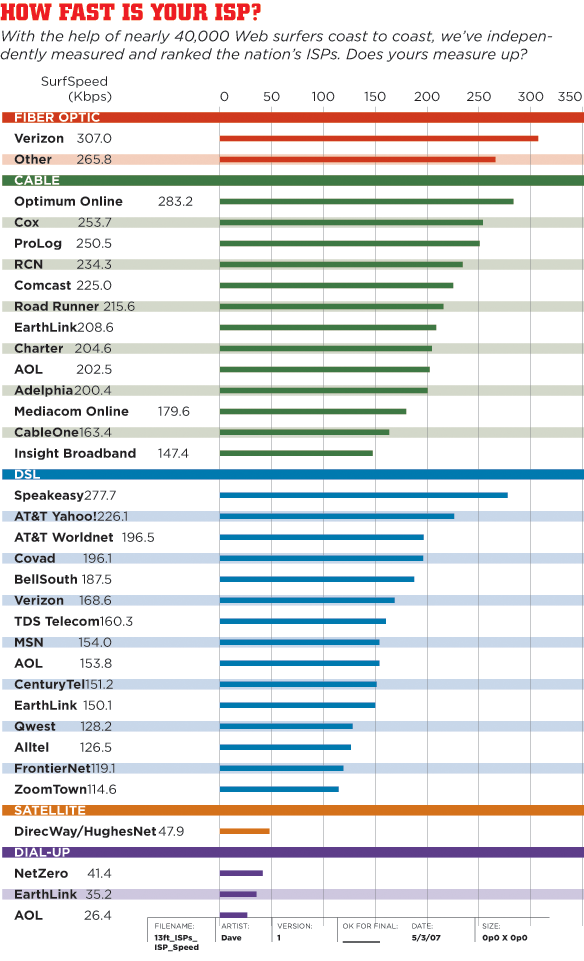
Best ISPs in America


PC Magazine

Labels:

Friday, July 6, 2007

Live Earth concert(s)

Live Earth is a music event that begins July 7 to raise awareness about global warming with 24 hours of music across 7 continents, and performances by more than 150 of the world's top musicians...

It starts 6 p.m. PT/9 p.m. ET, and wil be streamed

The Sundance Channel, NBC, CNBC, and BRAVO will also broadcast some of the shows.

Labels: